

Table of Contents
ToggleDiscussion posts are one of the most important parts of online courses. These can help you prepare for class, learn discussion skills, practice writing skills, and also learn from others. However, since the entire communication happens in writing, expressing your ideas clearly is crucial in these cases.
Online students often complain about stress and the lack of proper communication. Discussion posts can bridge the gap, but it is essential to craft an effective one to start the conversation. This blog will guide you on how to write A+ discussion posts for online courses.
Learn and engage in asynchronous online discussions and posts to enhance your skills and become an active participant in online courses.
Why Are Online Discussion Posts Important in Online Courses?
Most online students often ignore online discussion boards. They look at it as an added task. But these are the ones that can help you enhance your skills and learn from your peers. The board also acts as a bridge between you and your professor. Let’s take you through the reasons it is an important component of online classes:
For Professors
In a traditional classroom setup, professors could determine if students were learning the material and also ask questions on the spot. Online learning technology does not give the scope to gauge a student’s understanding.
Online discussion boards for students bridge that gap. A well-written and compelling online discussion post helps instructors understand whether you have grasped the lesson or not. Also, it reflects student engagement during the online classes.
For You
Discussion boards in an online environment have more than one benefit to online students. First, when you explain a topic to someone else, you automatically gain a better understanding of it. Furthermore, when writing an online classroom discussion board post, you need to organize your thoughts, clarify your position, and explain complex ideas; this strengthens your grasp of the subject.
Additionally, when you interact with your classmates by joining discussion groups and learn about different perspectives on the same topic, it leads to various interpretations and viewpoints that you might not have considered. This helps learn lessons better. Ultimately, the entire process can help you hone your professional skills, such as communication.
This explains the importance of discussion forums and the need for active participation in achieving a better learning experience. But how do you write a strong and engaging post? The following section will answer the question.
Steps to Follow Before You Write a Discussion Post
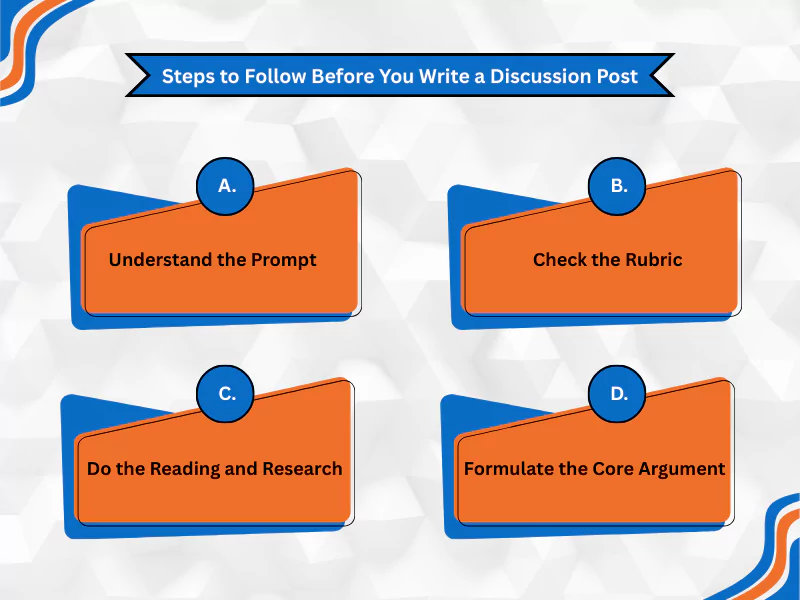
Discussion posts are generally initiated by the professors. So, before you start working on a discussion post, you need to go through the following points:
A. Understand the Prompt
The first thing to look at is the prompt for the discussion post. A good prompt not only tells what to discuss, but also explains how to approach the topic. Look for words like ‘analyze,’ ‘compare,’ ‘evaluate,’ and ‘reflect’ to understand the level of thinking. Also, look for the hidden requirements to create an effective discussion online.
B. Check the Rubric
If a rubric is provided with the prompt, check it thoroughly. The grading rubric serves as a guide, outlining the expectations in terms of length, number of replies, and overall structure that can directly impact your grades. This helps you formulate your strategies and be more attentive to the posts you create.
C. Do the Reading and Research
This is non-negotiable. You need to master the topic on which you will write the discussion post. Don’t just go through the chapters; take notes as you read, note key concepts, quotes, and page numbers. This will save time while writing the post. Additionally, conduct further research if necessary, or if you need to incorporate a unique perspective.
D. Formulate the Core Argument
Once you have gathered the necessary points and understood the prompt, work on creating your core argument. The aim is to create a specific and clear point of view that answers the main discussion question. The argument will serve as the main idea or the topic sentence.
All of these form the initial steps before you start writing the discussion post. The following section will help you understand how you can add finesse and create an A+-worthy discussion post.
How to Write A+ Discussion Posts for Online Courses: A Step-by-Step Guide
Consider your initial post as a mini-essay that must have a clear beginning, middle, and end. Here’s how you can do it:
A. The Opening (Hook and Thesis)
You need to create an opening that instantly grabs the reader’s attention. It is recommended that you use a thought-provoking question, a surprising fact, or a relevant personal anecdote to get the readers’ attention.
End your opening section with the main argument you have formulated. This will help readers understand the main point of the post. An A+ discussion post features a clear and concise thesis statement that provides context for the topic.
B. The Body Paragraphs
The body paragraphs are where you explain your point. Each body paragraph must discuss a specific point supporting your thesis. Break each paragraph down into three different parts, such as:
- Topic sentence – Use this to introduce the main idea of the paragraph and connect it to your overall thesis.
- Evidence – Support the claims you make with evidence. Use information from credible sources and cite each of them using proper citations. Refer back to the instructions to understand the style you are asked to use and cite accordingly.
- Elaboration – Once you have presented your evidence, you need to connect it to your point. Explain how the evidence supports the point you make. It will add more value to the post.
- Original thought – The idea is not about making a point and supporting it. You need to share your original thoughts, unique insights, and connect them to real-world examples. It helps demonstrate a deep understanding of the course material.
C. The Conclusion
The conclusion is where you end your post and encourage more discussion. In this section, you summarize all the points you have talked about in the entire post. Since this is a discussion post, please continue the discussion beyond this point. Ensure that you conclude with a thought-provoking question that can take the discussion further.
An A+ post is not only about following this structure, but it is also about including all these points properly to make it stand out. Here’s an example to help you understand it better:


Going Beyond the Basics: The Extra Touch for Effective Online Discussions
Perfecting a discussion post is not only about using the correct points and following the structure; it is also about walking the extra mile. You need to take steps to reach a wider audience and make your post stand out from the crowd.
A. Engage with Your Peers
Don’t expect your peers to interact with your post if you don’t do the same. It is essential to respond to other students’ posts. However, don’t make the mistake of responding with one-word answers like ‘I agree.’ Add a counter question or post a counterargument respectfully. Peer-to-peer interaction is necessary.
B. Proofread and Edit
Review your post carefully to correct spelling and grammatical errors. Also, check for clarity and flow to ensure your post reads well and is easily understandable. It is recommended that you read your post aloud to identify awkward phrasing and make the necessary changes immediately. Follow a proper format and keep it concise. You can also avail ‘do my online class’ services to get assistance with proofreading and editing.
C. Be a Thought Leader
You need to establish yourself as a thought leader. Encourage your peers to utilize external resources and cite each one properly. Also, advise them to use real-world examples to connect with the points they make in their posts and responses.
All of these will help establish the ground and make your post worthy of an A+. You can look for expert assistance to learn more about how to get good grades in online classes and get discussion post help.
Putting It All Together: Your New Discussion Board Strategy
The key to writing a good discussion post lies in how you prepare. You need to understand the importance of these student posts and how they play a crucial role in the course design; therefore, go through the discussion prompts and instructions before writing them down. Ensure that you create a post that invites further thoughts and encourages readers to engage with it. Academic writing is all about understanding the question and answering it correctly.
Further, go through what you have written, rectify, and fine-tune the post before you click on ‘submit.’ Understand the learning objectives, discuss with your professor, and work on your post. You can also use discussion tools like voicethread to work on your post.
All the best!
Frequently Asked Questions
How long should my discussion post be?
You must check the rubric first before writing a post for discussion boards in online courses. Your professor will specify a word count, such as 250-300 words for posts and 100-150 words for replies. Go through the course content and the type of discussion before writing your post.
What should I do if I disagree with a classmate’s post?
Disagreement can be a healthy part of encouraging discussion. You need to be respectful to facilitate discussion in an online learning environment. Try asking questions about the points you disagree with, instead of criticizing your classmates. After you make your point, support it with relevant data. This is one of the best practices if you want to disagree with a classmate’s post.
Do I really need to use citations in a discussion post?
Yes, in case you are using any ideas or quotes in an online discussion forum, you need to use citations. Check the required prompts and instructions, and cite your sources as per the required citation style. Since this is not a face-to-face discussion, you need to acknowledge your sources to keep it relevant. Also, as these are used for providing feedback and grading, it is necessary to cite the sources properly.
How early in the week should I make my initial post?
Aim to make the introduction post for online class and provide feedback to one or more of them. It reflects that you are proactive and engaged, and also gives you a wider selection of high-quality posts from your classmates to reply later in the week.